Article 5 of 6 · September 2026
How to work with one without getting burned
Article 5 of 6 · the slider, the loop, the leash, and the suit · after Andrej Karpathy
The first three articles were about what the model is. This one is about how to work with it, and it comes almost entirely from Andrej Karpathy's 2025 keynote at Y Combinator's AI Startup School, Software Is Changing (Again), with a closing thought from his Deep Dive into LLMs like ChatGPT. He was speaking to people who build software. Every idea translates to anyone who has a job to do and a chat window open.
1. The slider
Karpathy's first picture is a slider.
He describes a coding tool, Cursor, which offers four levels of help. At the lowest, it suggests the next few words as you type. One step up, you select a piece and ask for that piece to be changed. One more, it rewrites a whole file. At the top, you tell it to go and do the whole job across the whole project and come back when it is done. His name for this is the autonomy slider, and his point is that you hold it: for each task, you decide how much control you are willing to give up.
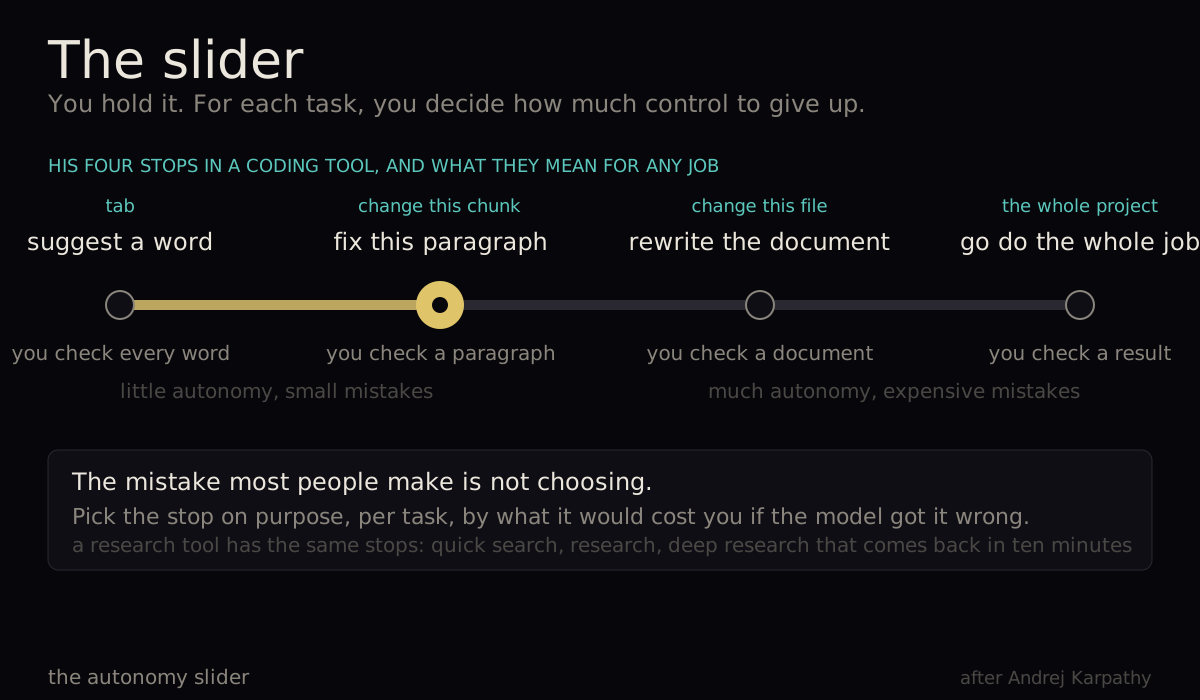
Outside coding the stops are the same. Suggest a word. Fix this paragraph. Rewrite the document. Go and produce the whole report. He shows a research tool with the same shape: a quick search, a research pass, or a deep research run that takes ten minutes and comes back with a report.
The mistake most people make is not choosing. They ask for the whole job when a paragraph would do, or they nudge one sentence at a time when they could have handed over the draft. Pick the stop on purpose, per task, based on how much it would cost you if the model got it wrong.
2. You are the bottleneck, so make the loop short
The second picture is a loop, and it is the one that decides how much you actually get done.
Karpathy's description of working with these tools: they generate, you verify. That is the whole relationship. And since the model can generate faster than you can check, you are the bottleneck. So the only speed that matters is the speed of the loop: generate, check, correct, generate again.
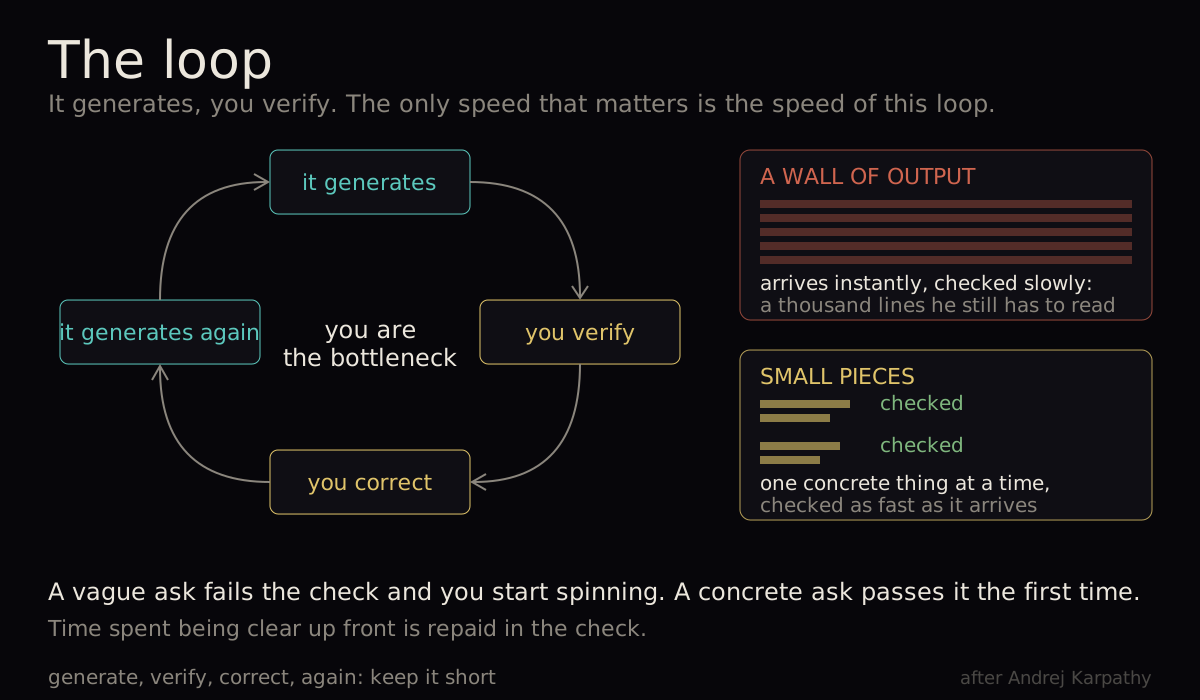
He is blunt about what breaks it. A tool that dumps a thousand lines of code on him is not useful, because he still has to read every line to make sure it did not introduce a bug. The output arrived instantly; the checking did not. So he works in small pieces, one concrete thing at a time, and keeps the loop spinning fast.
The same goes for how you ask. A vague request produces something that fails your check, you re-explain, and now you are spinning. He says it is worth spending a bit more time being concrete up front, because it raises the chance that the check passes the first time.
Where a check can be written down, write it down: a test the code must pass, a gate the page must clear, a number the result must match. A written check runs every time, and it does not get tired.
3. Look, do not read
His third point is about your eyes.
Text is slow to verify. A page of prose has to be read, line by line, and reading is effortful. A picture is fast. When his coding tool shows a change as red lines removed and green lines added, he can judge it in a second and accept or reject with a keystroke. His phrase is that looking at things uses the visual hardware in your head, and it is a highway to your brain.
You can ask for that. Ask for a table instead of paragraphs. Ask for before and after side by side. Ask for a checklist you can tick, a list of what changed, a one-line summary above the detail. Anything that turns reading into looking shortens the loop.
4. The leash
Now the picture that most people need and few have.
Karpathy says plainly that people are getting over-excited about agents, and that his own experience is that an over-eager tool doing a lot on its own does not help him get work done. He wants the model on a leash.
His example is education. Ask a chatbot to teach you physics and it wanders off; in his words, it gets lost in the woods. His answer is not a better chatbot. It is a course: a written syllabus and progression that one tool helps a teacher create, and another tool then teaches from. The course sits in the middle. A person can read it, check it, fix it. The model is kept on the leash of that document.
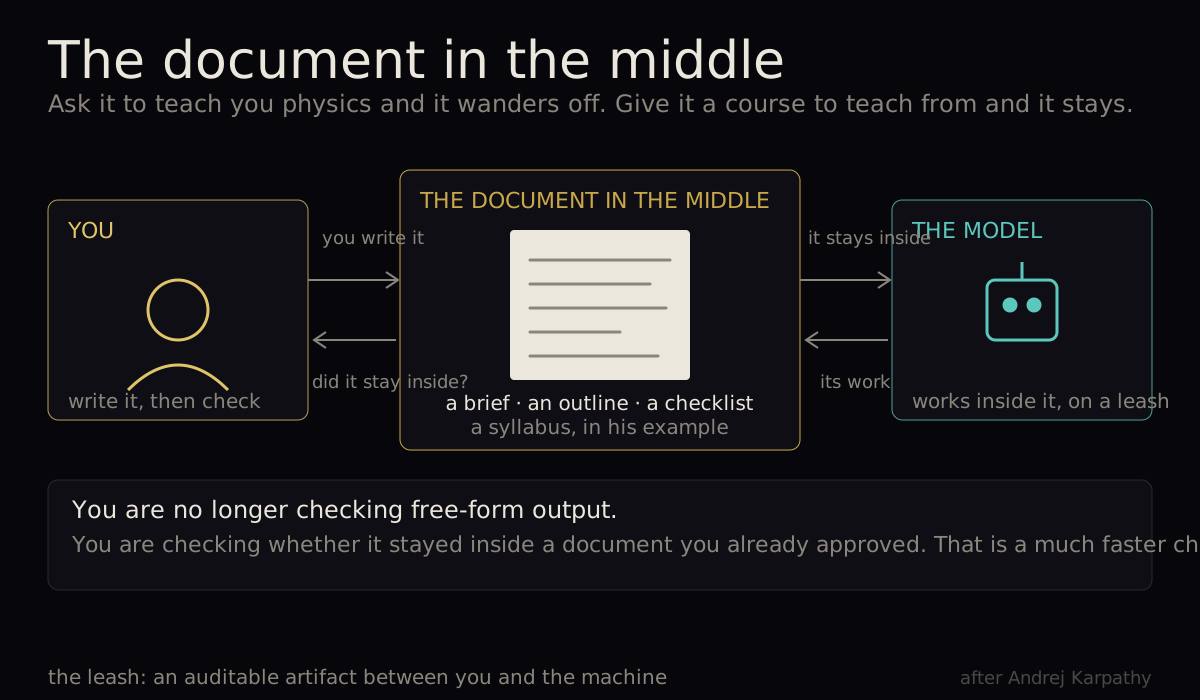
For anyone's work the shape is the same. Put a written thing between you and the model: a brief, an outline, a checklist, a template with the fields you need. Make the model produce that first, check it, then let it work inside it. You are no longer checking free-form output; you are checking whether it stayed inside a document you already approved.
5. Suits, not robots
He is careful about how far to push all this, and he has earned the caution.
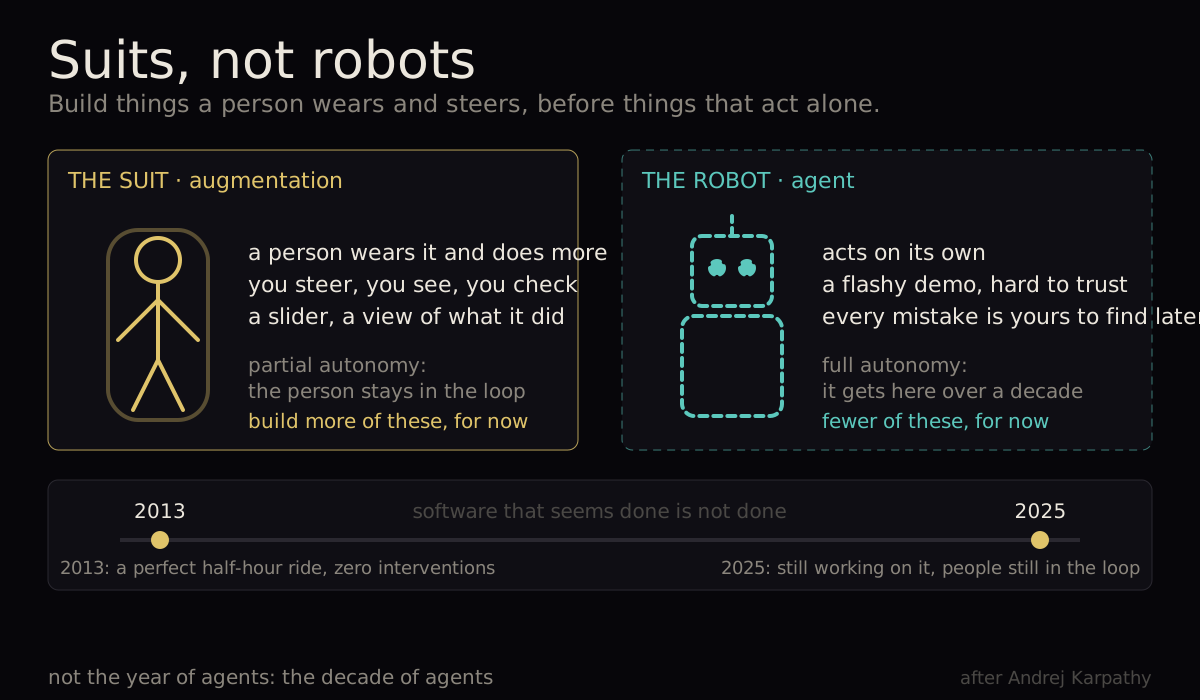
He tells the story of his first ride in a self-driving car, in 2013: a half-hour drive around Palo Alto with no interventions at all. It felt finished. Twelve years later, he says, the industry is still working on it, and there is still a lot of human help behind the scenes. Software that seems done is not done. So when people call this the year of agents, his answer is that it is the decade of agents.
His picture for the right amount of ambition is the Iron Man suit. The suit is an augmentation: a person wears it and does more. In some films it also flies around on its own, and that is the agent. His advice for now: build more suits and fewer robots. Fewer flashy demos of things acting alone; more products where a person works faster with the machine, with a slider, and with the ability to see and check what it did.
The larger version of the same thought comes from his other lecture. Factories talk about the ratio of humans to robots. He expects the digital world to develop a ratio of humans to agents, with people increasingly supervising work rather than doing every step. Supervising, not absent.
6. Make things easy for it
One more idea, mainly for anyone who runs a website or writes instructions.
He built a small app in a day, and then spent a week making it real: sign-in, payments, a domain, hosting. Almost none of that week was code. It was following instructions written for humans: go to this page, click this menu, choose that option. A computer telling a person which buttons to press.
His conclusion is that software should start meeting these models halfway. Documentation written as plain text rather than pages of menus. A simple text file on a website that tells a model what the site is about. Wherever instructions say "click here", a command a model could run instead. He is not saying the models cannot click; he is saying that making it easy for them is cheap and pays off.
7. Own the product
The closing thought, from the Deep Dive, is the same one that ends article 3. These tools are excellent and they have holes. Check their work, use them for the first draft and for ideas, and stay responsible for the product of your own work. The slider, the loop, the leash and the suit are all ways of doing exactly that.
What to do tomorrow
- Choose the slider stop, per task, on purpose. A word, a paragraph, a document, or the whole job. Decide by what a mistake would cost.
- Work in small pieces and be concrete. One thing at a time, checked, then the next. Time spent on a clear ask is repaid in the check.
- Ask for things you can look at. Tables, before and after, checklists, a summary line above the detail.
- Put a document in the middle. A brief or outline you approve first; then hold the model inside it.
- Build suits. Make your own work partly automatic while keeping a person supervising, and keep the loop short enough to notice a mistake.